Test a Google Forms response limit before launch
Before you share a capped Google Form, prove the limit on a copied form. Set a tiny cap, submit sample responses, reload the public form, and confirm the closed message and owner alert work before real visitors depend on it.
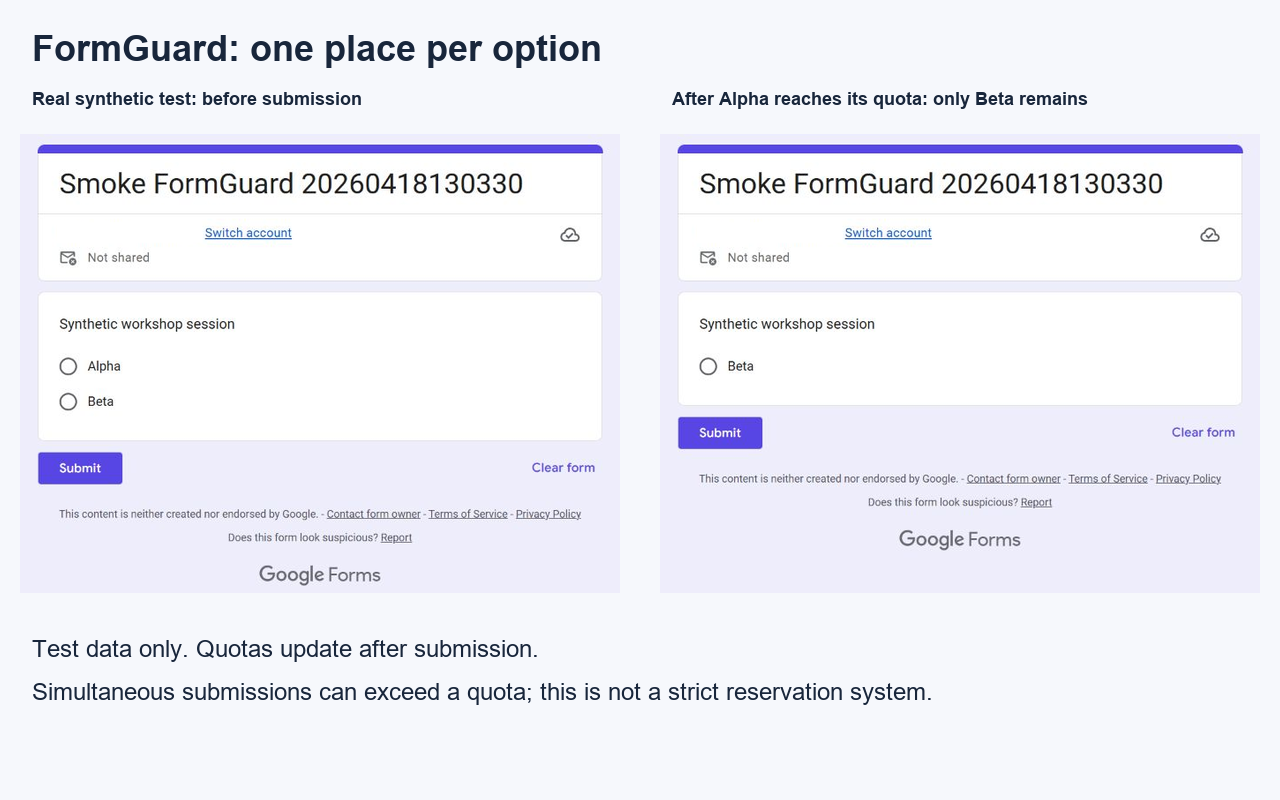
Try one choice quota with Alpha and Beta
For a simple total response cap or closing date, first check the native controls in Google Forms. Use this FormGuard test when each choice needs its own limit. The Free plan supports one quota question per form.
- Create a disposable form with one required multiple-choice question, Workshop session, and the options Alpha and Beta.
- Install FormGuard, open its settings, enable choice quotas and set Max per option = 1 for that question. Keep other rules off for this test and save.
- Publish the test form for your intended test audience and submit one Alpha response through its respondent link.
- Open a fresh respondent page. Alpha should be removed and Beta should remain. If both remain, stop and request setup help.
- Optionally submit Beta too. When every choice is full, the current build shows (All options filled); it does not automatically close the whole form.
- Disable the test rule and unpublish the copied form. Keep the result private unless you choose to share a redacted screenshot with support.
Choice quotas run after submission. Simultaneous responses can exceed a quota. This is not a strict seat-reservation or payment system.
One school, one staff member, no student records
Start with the synthetic Alpha/Beta check above, using an account permitted by your school. Do not invite students or import student records for this first check. If administrator approval is required, stop and ask your school administrator.
Before any real school rollout or Pro activation, confirm the participating school, named staff accounts, term, support scope and procurement/privacy requirements in writing. An executed agreement alone does not mean a school has accepted or deployed a pilot.
Quick answer
Do not test a response cap for the first time on a live registration form. Use a disposable copy, set the cap to 1 or 2, submit enough sample responses to trigger it, then inspect what a late visitor sees.
The public form should stop accepting responses after the test cap is reached.
The visitor should see clear wording, not a vague or unfinished message.
If a waitlist, contact email, or alternate form exists, the link should work.
The operator should know the cap triggered and the form is now closed.
First-run test with FormGuard
- Duplicate the Google Form or create a disposable test form.
- Install FormGuard and open it from the Google Forms editor.
- Create a response cap rule with a tiny limit such as 1 or 2.
- Add the exact closed-form message you want late visitors to see.
- Enable owner notification if the real workflow needs an alert.
- Submit sample responses through the public form link until the cap should trigger.
- Reload the public form and confirm the form is closed, the message is clear, and any waitlist link works.
What to test before a real launch
Confirm whether the cap is the real maximum or a buffer below the real maximum.
State whether the form is full, closed by deadline, paused, or routed to a waitlist.
If many people may submit at once, use a buffer and manual review instead of promising exact final counts.
Decide who should update event pages, shared links, or support replies after the form closes.
Try it with one real operator
Run this small test in your own account, then send the result or the step that failed. Use synthetic data first. Setup help, screenshots and reviews are optional; no purchase is needed for this first check.